
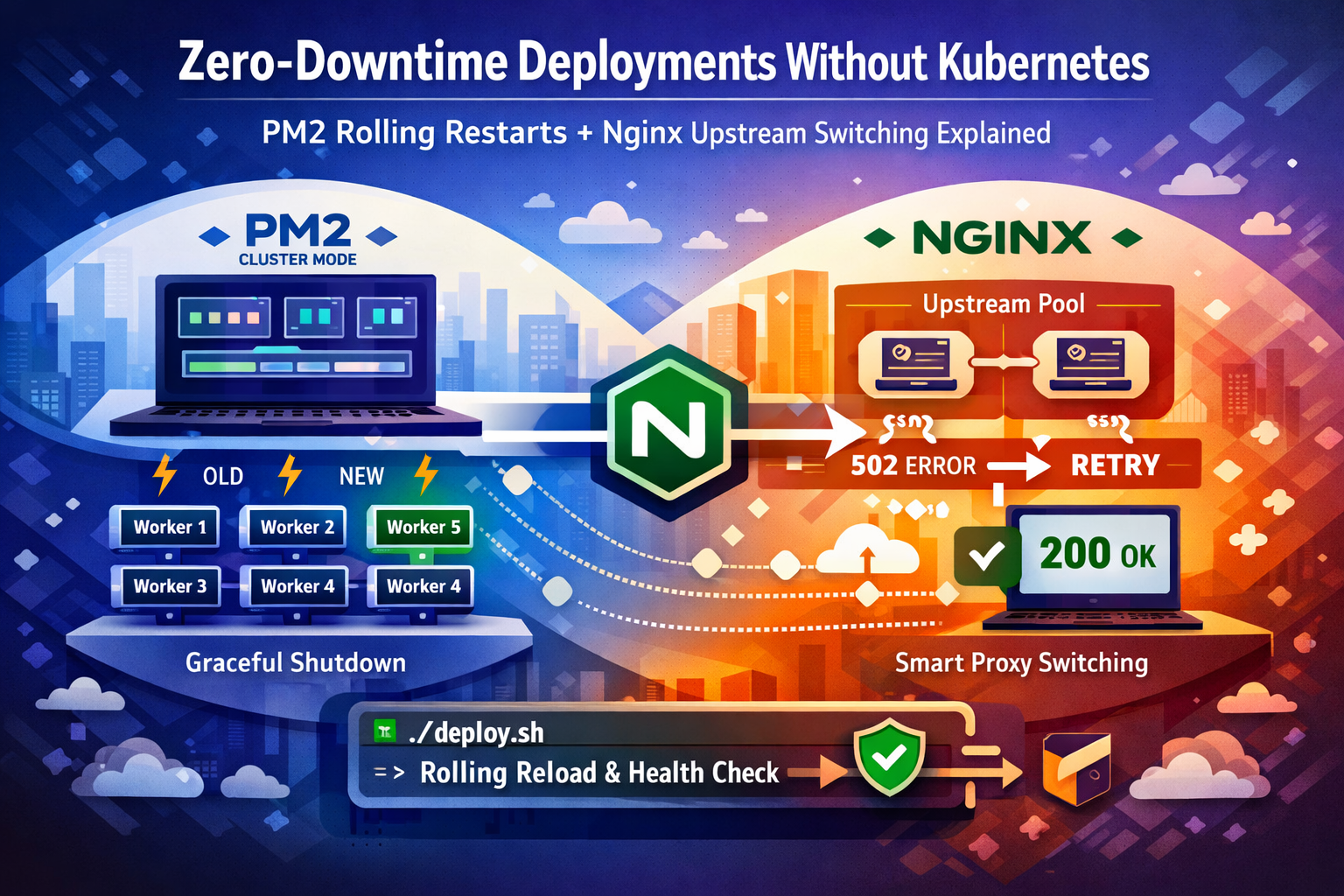
How to eliminate 502 Bad Gateway errors during Node.js deploys using PM2 cluster mode, graceful shutdown signals, and Nginx proxy_next_upstream — no Kubernetes required.
You push a critical hotfix at 11 PM. The deploy completes in under five seconds. Then Slack erupts — 502 Bad Gateway. Fourteen users hit the error wall. Your CDN already cached it. You’re frantically clearing cache while simultaneously watching PM2 logs spiral.
This exact incident has played out in more production environments than anyone admits publicly. The kneejerk answer from the internet is always “use Kubernetes” — but for teams running under 5,000 RPS on one or two servers, Kubernetes introduces months of operational overhead to solve a problem that can be fixed in an afternoon with PM2 and a properly configured Nginx upstream block. When these two are set up correctly together, your deploy window goes from 4–8 seconds of user-visible 502s to exactly zero.
This is not a theoretical walkthrough. Every config here has been battle-tested in real Oracle Cloud and bare-metal production environments. We’ll cover the exact PM2 ecosystem setup, the Node.js graceful shutdown pattern that most tutorials skip, the Nginx directives that close the restart gap, and a deploy script with automatic health polling and rollback — the full picture, end to end.
⚡ Why pm2 restart Silently Kills Your Users
Most teams start with pm2 restart app in their deploy script. This feels safe because PM2 brings the process back up — but the sequence of events is brutal:
- PM2 sends
SIGINTto the running process - Node.js begins shutdown — active connections are abruptly cut
- There is a window (typically 2–6 seconds) where no process is listening on the port
- Any request Nginx forwards during that window hits a refused connection
- Nginx returns
502 Bad Gatewayto the client
With a single-instance setup, this gap is unavoidable with a naive restart. With PM2 cluster mode and pm2 reload, PM2 keeps the old workers alive until new ones signal readiness — but only if you implement the ready signal correctly. Most guides stop at the PM2 config and miss the Node.js side entirely. That’s the gap this post closes.
# What most teams do — and why it causes 502s
git pull origin main
npm install --production
pm2 restart app          # ← SIGINT → gap → SIGINT → new process. Users feel every millisecond.
🔧 PM2 Cluster Mode: The Foundation You Cannot Skip
Before anything else, your app must run in PM2’s cluster mode. Cluster mode spawns N worker processes using Node’s built-in cluster module. PM2 can then reload workers one at a time — keeping the rest serving traffic — instead of killing the entire process tree at once.
The ecosystem config is the canonical way to define this. It replaces fragile CLI flags and makes the setup reproducible across environments. Here’s the production-grade baseline:
// ecosystem.config.js
module.exports = {
  apps: [{
    name: 'myapp',
    script: './dist/server.js',

    // Cluster mode: spawn one worker per CPU core
    instances: 'max',
    exec_mode: 'cluster',

    // PM2 waits for process.send('ready') before routing traffic
    // If the signal doesn't arrive within listen_timeout ms, PM2 marks the worker failed
    wait_ready: true,
    listen_timeout: 10000,   // 10s — generous for apps with DB connection warmup

    // How long PM2 gives the old worker to finish in-flight requests before SIGKILL
    kill_timeout: 8000,      // 8s — must be > your slowest expected request

    // Prevent flapping — only restart if at least 3s have passed since last restart
    min_uptime: 3000,
    max_restarts: 5,

    // Environment-specific config
    env_production: {
      NODE_ENV: 'production',
      PORT: 3000
    },

    // Log rotation
    error_file: '/var/log/myapp/error.log',
    out_file: '/var/log/myapp/out.log',
    log_date_format: 'YYYY-MM-DD HH:mm:ss Z',
    merge_logs: true
  }]
};
Two settings here are non-negotiable: wait_ready: true and kill_timeout. Without wait_ready, PM2 considers a worker “up” the moment the process starts — before your Express server, database pool, or any async initialization completes. Without a sufficient kill_timeout, PM2 SIGKILLs the old worker before it can finish serving in-flight requests.
💻 Graceful Shutdown: The Part Every Tutorial Misses
Setting wait_ready: true in the ecosystem config does nothing on its own unless your application actually sends the ready signal after it’s genuinely ready to serve traffic. This is the single most common misconfiguration I’ve seen in production — teams enable wait_ready but never instrument their server code, so PM2 falls back to a timeout-based approach and the “zero downtime” deploy is anything but.
Here’s the complete pattern for an Express application — including the SIGTERM handler that ensures in-flight requests complete before the old worker exits:
// server.js
const express = require('express');
const app = express();

// ... your routes, middleware ...

async function start() {
  // Run any async initialization here — DB connections, cache warmup, etc.
  await connectDatabase();
  await warmupCache();

  const server = app.listen(process.env.PORT || 3000, () => {
    console.log(`Worker ${process.pid} listening on port ${process.env.PORT}`);

    // THIS is what PM2's wait_ready is waiting for.
    // Only send this after the server is genuinely accepting connections.
    if (process.send) {
      process.send('ready');
    }
  });

  // Graceful shutdown on SIGINT (pm2 reload) or SIGTERM (system shutdown)
  const shutdown = (signal) => {
    console.log(`Worker ${process.pid} received ${signal} — closing gracefully`);

    // Stop accepting new connections immediately
    server.close(() => {
      console.log(`Worker ${process.pid} — all in-flight requests complete. Exiting.`);
      process.exit(0);
    });

    // Safety net: force exit if graceful shutdown takes too long
    // This should be less than PM2's kill_timeout
    setTimeout(() => {
      console.error('Forced shutdown after timeout');
      process.exit(1);
    }, 7000);
  };

  process.on('SIGINT', () => shutdown('SIGINT'));
  process.on('SIGTERM', () => shutdown('SIGTERM'));
}

start().catch(err => {
  console.error('Failed to start server:', err);
  process.exit(1);
});
The sequence during a pm2 reload with this in place: PM2 spawns a new worker → new worker connects to DB, warms up, calls listen() → server sends process.send('ready') → PM2 starts routing new requests to the new worker → PM2 sends SIGINT to the old worker → old worker stops accepting new connections and waits for in-flight requests to complete → old worker exits cleanly. The overlap is intentional and seamless.
⚙️ Nginx Upstream Configuration That Closes the Gap
Even with perfect PM2 configuration, there’s still a narrow window during the handoff where a request can slip through to a worker in the middle of shutdown. The Nginx upstream block is your last line of defense. Most tutorials show a dead-simple proxy_pass with no fault tolerance. Here’s the configuration that handles it properly:
# /etc/nginx/sites-available/myapp.conf

upstream myapp_cluster {
    # Use least_conn for more even distribution during rolling reload
    least_conn;

    server 127.0.0.1:3000;

    # Keep persistent connections to your upstream — avoids TCP handshake overhead
    keepalive 32;
}

server {
    listen 80;
    listen 443 ssl http2;
    server_name yourdomain.com;

    # SSL config omitted for brevity

    location / {
        proxy_pass http://myapp_cluster;
        proxy_http_version 1.1;

        # Required for keepalive upstream connections
        proxy_set_header Connection "";

        proxy_set_header Host              $host;
        proxy_set_header X-Real-IP         $remote_addr;
        proxy_set_header X-Forwarded-For   $proxy_add_x_forwarded_for;
        proxy_set_header X-Forwarded-Proto $scheme;

        # The critical directive: if this upstream server returns an error or times out
        # on a non-idempotent request (GET, HEAD), try the next available upstream.
        # This covers the brief window during PM2 worker handoff.
        proxy_next_upstream error timeout http_502 http_503 http_504;
        proxy_next_upstream_tries 2;
        proxy_next_upstream_timeout 5s;

        # Timeouts — tune to your app's actual p99 response time
        proxy_connect_timeout 5s;
        proxy_send_timeout    60s;
        proxy_read_timeout    60s;
    }

    # Health check endpoint — used by deploy script
    location /health {
        proxy_pass http://myapp_cluster;
        proxy_connect_timeout 2s;
        proxy_read_timeout    5s;
        access_log off;
    }
}
proxy_next_upstream is what makes the Nginx side bullet-proof. If a worker goes down mid-handoff and Nginx gets a connection refused or a 502 on a retryable request, it immediately tries the next worker in the upstream pool — transparently, with zero user-visible error. Note that by default Nginx only retries on safe (idempotent) methods. For POST requests, you’d need to add non_idempotent to the directive — but be cautious, as retrying POST can cause duplicate actions depending on your API design.
🚀 The Production Deploy Script
Now the pieces come together. This is the actual deploy script I use — it pulls new code, installs dependencies, runs the PM2 reload, polls the health endpoint until the cluster is fully up, and rolls back automatically if anything goes wrong. No manual intervention required.
#!/bin/bash
set -euo pipefail

APP_DIR="/var/www/myapp"
APP_NAME="myapp"
HEALTH_URL="http://localhost:3000/health"
HEALTH_RETRIES=20      # 20 * 3s = 60s max wait
HEALTH_INTERVAL=3

cd "$APP_DIR"

echo "=== Deploy started: $(date) ==="

# 1. Save current git SHA for rollback
PREVIOUS_SHA=$(git rev-parse HEAD)
echo "Previous SHA: $PREVIOUS_SHA"

# 2. Pull latest code
echo "Pulling latest code..."
git pull origin main

CURRENT_SHA=$(git rev-parse HEAD)
echo "New SHA: $CURRENT_SHA"

# If nothing changed, bail early
if [ "$PREVIOUS_SHA" = "$CURRENT_SHA" ]; then
  echo "No new commits. Exiting."
  exit 0
fi

# 3. Install dependencies (production only, skip devDependencies)
echo "Installing dependencies..."
npm install --production --silent

# 4. Build step (TypeScript, bundlers, etc.) — skip if not applicable
if [ -f "tsconfig.json" ]; then
  echo "Building TypeScript..."
  npm run build
fi

# 5. PM2 rolling reload — keeps cluster alive, replaces workers one at a time
echo "Reloading PM2 cluster..."
pm2 reload "$APP_NAME" --update-env

# 6. Health check poll — don't declare success until the cluster responds
echo "Waiting for health check to pass..."
for i in $(seq 1 $HEALTH_RETRIES); do
  HTTP_STATUS=$(curl -s -o /dev/null -w "%{http_code}" --max-time 5 "$HEALTH_URL" || echo "000")

  if [ "$HTTP_STATUS" = "200" ]; then
    echo "Health check passed (attempt $i). Deploy complete."
    echo "=== Deploy finished: $(date) ==="
    exit 0
  fi

  echo "  Attempt $i/$HEALTH_RETRIES — got HTTP $HTTP_STATUS. Waiting ${HEALTH_INTERVAL}s..."
  sleep "$HEALTH_INTERVAL"
done

# 7. Health check failed — automatic rollback
echo "ERROR: Health check failed after $HEALTH_RETRIES attempts. Rolling back to $PREVIOUS_SHA..."
git checkout "$PREVIOUS_SHA" -- .
npm install --production --silent
pm2 reload "$APP_NAME" --update-env

echo "ROLLBACK COMPLETE. Paging on-call."
# Hook in your alerting here: curl Slack webhook, PagerDuty, etc.
exit 1
The health check polling loop is what separates this from a naive deploy script. PM2 reports online status the moment a worker sends the ready signal — but with a cluster of 4 workers, all four need to complete the rolling reload before the cluster is at full capacity. The poll loop gives you an objective signal based on actual HTTP responses, not PM2 internal state.
🌍 Real-World Scenario: What Actually Happens During Deploy
Here’s the exact second-by-second sequence when this runs on a 4-worker cluster handling live traffic:
T+0s — pm2 reload myapp executes. PM2 spawns Worker 5 (new). Workers 1–4 continue serving all traffic.
T+2s — Worker 5 connects to DB, warms cache, calls listen(), sends process.send('ready'). PM2 starts routing 20% of new requests to Worker 5.
T+2.1s — PM2 sends SIGINT to Worker 1. Worker 1 calls server.close() — stops accepting new connections. All Worker 1’s in-flight requests drain and complete. Worker 1 exits with code 0.
T+4s — Workers 2, 3, 4 cycle through the same sequence. Worker 5 is serving progressively more traffic throughout.
T+8s — New Workers 5, 6, 7, 8 are all online. PM2 cluster is at full capacity. Health check returns 200. Deploy script exits 0.
User experience throughout: zero errors, zero 502s. The Nginx proxy_next_upstream catches any micro-gap during worker transitions. From the outside, the application never hiccupped.
🎯 Best Practices From Production
Never use pm2 restart for rolling deploys. Use pm2 reload. The difference: restart kills the entire cluster simultaneously, reload cycles workers one at a time. This is the most critical distinction and the one teams get backwards most often.
Your health endpoint must be non-trivial. A health check that just returns 200 OK regardless of state is worse than useless — it hides real problems and gives false confidence to your deploy script. At minimum, it should verify your database connection is live:
// A health endpoint that actually means something
app.get('/health', async (req, res) => {
  try {
    // Verify DB connectivity with a cheap query
    await db.query('SELECT 1');

    res.status(200).json({
      status: 'ok',
      pid: process.pid,
      uptime: Math.floor(process.uptime()),
      memory: process.memoryUsage().heapUsed,
      timestamp: new Date().toISOString()
    });
  } catch (err) {
    // Return 503 so PM2 deploy script knows this worker isn't ready
    res.status(503).json({
      status: 'error',
      error: err.message
    });
  }
});
Set kill_timeout based on your actual p99 response time, not a guess. Run pm2 monit for a week in production and look at the longest requests you serve. Your kill_timeout should be at least 2x that value. If your slowest endpoint takes 3 seconds, set kill_timeout: 8000.
Log worker PID in every request during rollouts so you can correlate errors to specific workers. Add X-Worker-PID: process.pid as a response header in non-production environments. This has saved hours of debugging time when a single worker behaves differently after a deploy.
Test your rollback path before you need it. Deliberately break a deploy in staging and verify the health check catches it and the git rollback completes cleanly. The worst time to discover your rollback script has a bug is during a production incident at midnight.
🎓 Conclusion
Kubernetes is a phenomenal piece of infrastructure — for teams and workloads that genuinely need it. For a Node.js application serving tens of thousands of requests per day on one or two servers, it’s a solution looking for a problem. What you need is a correctly configured PM2 cluster with the ready signal wired up in your server code, an Nginx upstream block that retries on transient failures, and a deploy script that verifies the cluster is actually healthy before declaring success.
The total implementation time for everything in this guide is under two hours. The operational benefit — zero user-visible downtime on every deploy, forever — is permanent. More importantly, you now understand why each piece exists: the ready signal closes the startup gap, kill_timeout closes the shutdown gap, and proxy_next_upstream closes the handoff gap. There are no other gaps. That’s a complete solution.
If you’re running this on Oracle Cloud or any SELinux-enforcing system, remember that nginx needs the httpd_can_network_connect boolean set to on to proxy to your Node.js upstream — or you’ll get silent 502s that look exactly like the ones this entire guide is trying to eliminate.
📺 Want more technical tutorials?
Subscribe to TechScriptAid on YouTube for weekly content on enterprise development, .NET, DevOps, and modern architecture patterns!
Comments
2 responses to “Zero-Downtime Deployments Without Kubernetes: PM2 Rolling Restarts + Nginx Upstream Switching Explained”
Great
Thank you